
HIPPIE
How-To
Details on the information stored in HIPPIE and the multiple ways to access it.
- Welcome to HIPPIE
- Confidence scoring of experimentally measured interactions
- Query interactions
- Network construction
- Browsing the HIPPIE proteome
- Download the repository
- Example of a disease-centered HIPPIE workflow
- Example of a custom HIPPIE PPI network
- Sources
- Resource versions
- Isoforms
- Citation
- Contact
- Privacy
See also: Filter guide (every filter and source database explained) · REST API (programmatic access).
Welcome to HIPPIE
Welcome to HIPPIE (the Human Integrated Protein–Protein Interaction rEference)! We provide confidence-scored and functionally annotated human protein-protein interactions (PPIs). This page contains details on the information stored in HIPPIE and the multiple ways to access it. First-time users might want to start with the walk-through example to get an idea of what types of analyses can be performed with HIPPIE.
Back to topConfidence scoring of experimentally measured interactions
A core component of HIPPIE is the confidence scoring ($S$) of interactions based on the amount and reliability of evidence supporting them. This score is calculated as a weighted sum of evidence from three sources:
- Study score ($S_s$): Saturating score based on the number of studies reporting the interaction.
- Experimental score ($S_t$): Saturating score based on the summed score of different methods detecting the interaction.
- Orthologous score ($S_o$): Saturating score based on the number of species in which orthologous interactions have been observed.
The score is calculated as a weighted sum from each component as follows: $$ S = w_sS_s + w_oS_o + w_tS_t $$ Where $w_i$ is the weight of each component's contribution to the final score. Each individual component's saturation score, $S_i$, is calculated as: $$ S_i = \frac{2}{1 + e^{-a_i n}} - 1 $$ Where $n$ is either the number of studies, the scored sum of unique experimental methods detecting the interaction or the number of species in which an orthologous interaction was detected, and $a_i$ is each component's saturation parameter (how fast the score saturates with increasing evidence). The values of $a_i$ and $w_i$ were estimated in the HIPPIE 1.0 paper: $w_s = 0.6$, $w_t = 0.3$, $w_o = 0.1$ and $a_s = 2.3$, $a_t = 0.2$, $a_o = 1.6$. The weights sum to 1, so $S$ lies between 0 and 1. Evidence is pooled per gene pair, so the interactions of a gene's isoforms are scored on the evidence of the gene pair.
Currently, the mapping of orthologous interactions is based on the Alliance of Genome Resources (DOI), which consists of 8 species. As their resource provides human orthologs as reported by different methods, we consider a pair orthologous if at least 80% of methods agree. The non-human interactions are obtained from the IntAct database. The scoring of experimental methods can be found under the Download section.
Back to topQuery interactions
The query mode allows for querying HIPPIE with one or more proteins (up to 50, separated by comma, space or tab), each given as a UniProt identifier (id or accession), gene symbol, Entrez gene id or Ensembl id (ENSG/ENST). All interactions in HIPPIE that match any of the query proteins are displayed together.
If you want to query specific interactions directly, you may do so in the interaction query.
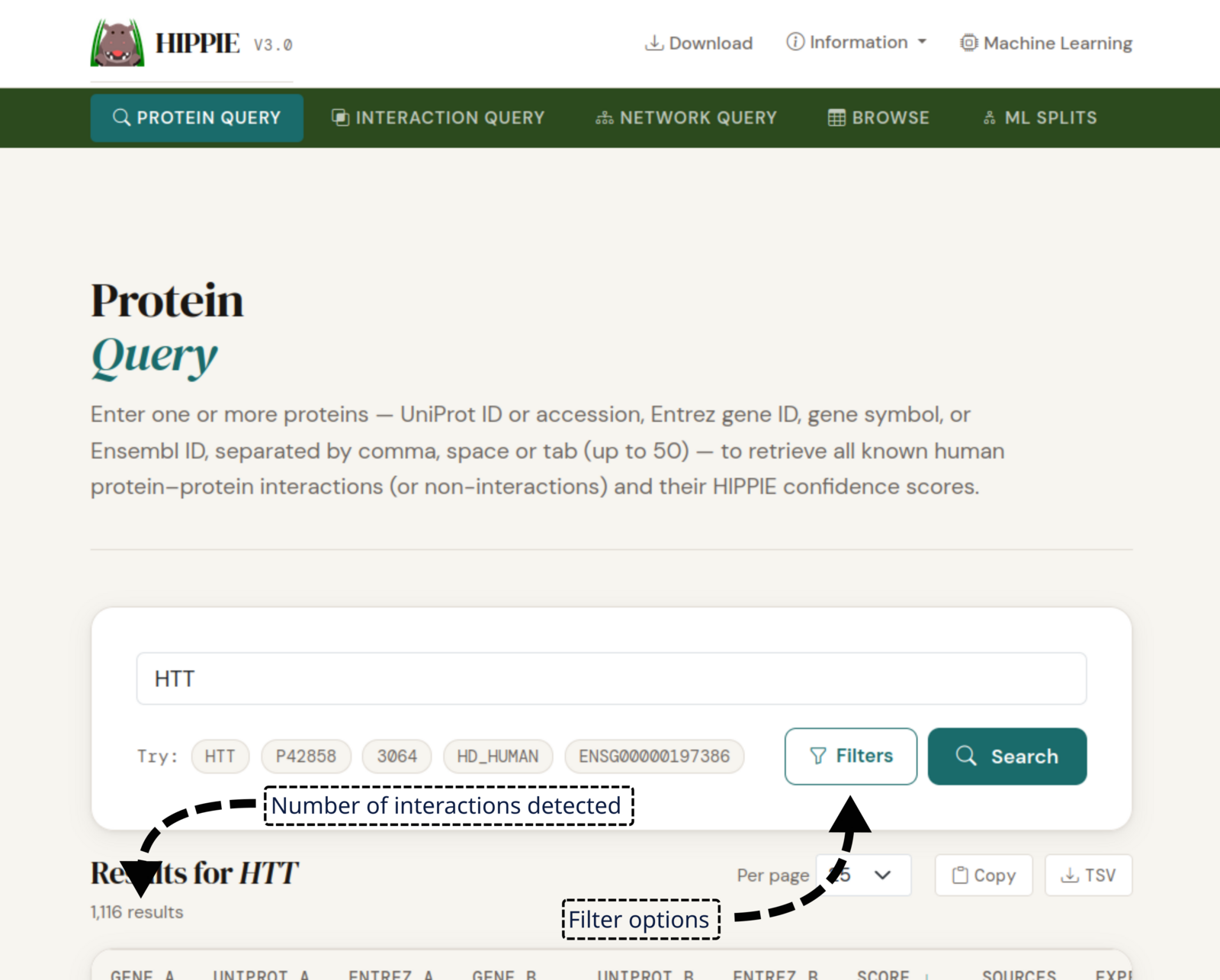
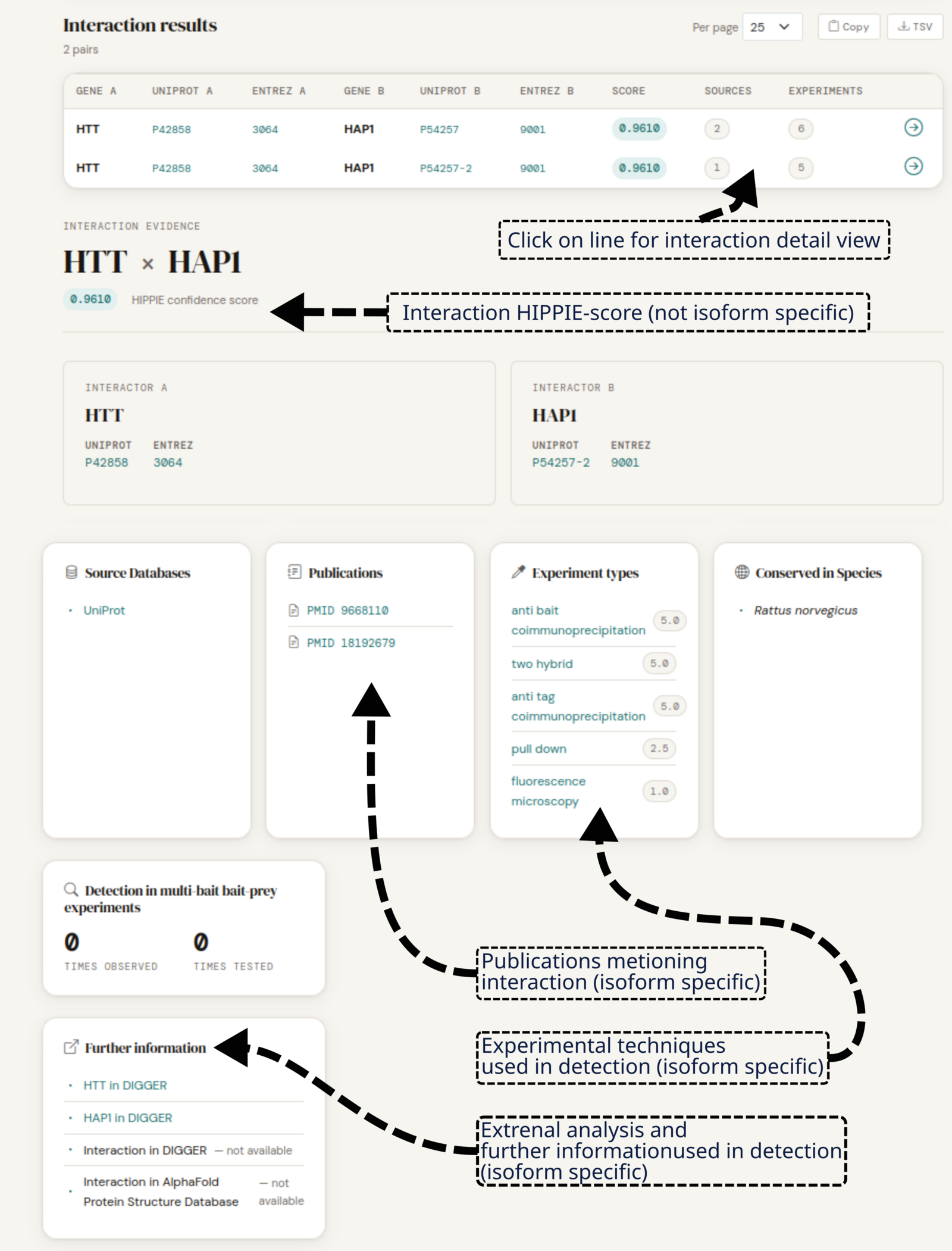
On the result page, each row lists the gene symbol, UniProt accession and Entrez gene id of both interactors, followed by the confidence score of the interaction and the number of source databases and experiment types supporting it. Clicking on the arrow button at the end of the row, or on the row itself, opens an evidence page which lists the source databases, the publications which mention the interaction, the experiment type used to detect it, and the species in which it is conserved.
Back to topNetwork construction
In the network construction mode, several proteins can be used as seed proteins to construct a first-order network: every HIPPIE interaction that touches a seed is added. The resulting network can be visualized graphically, listed in a tabular format in the browser or downloaded as a TSV file.
In the graph, seed proteins and interactions between two seeds are highlighted in red; the remaining edges are shaded by confidence score. Inputs that cannot be matched to a HIPPIE protein are listed separately with the result. Very large networks are drawn with a subset of their edges only (interactions between seeds are always kept), while the table and the download contain every edge. The filters restrict which interactions are pulled in from HIPPIE.
HIPPIE offers to display any constructed subnetwork with the light-weight network visualization tool Cytoscape.js.
Back to topBrowsing the HIPPIE proteome
The browsing mode in HIPPIE allows for the exploration of the entire set of proteins or interactions in the database. Note that loading the entire HIPPIE proteome may take a few seconds, depending on the type of Internet connection being used.
Back to topDownload the repository
The HIPPIE dataset is provided in two different download formats: PSI-MITAB 2.5 and our own tab-separated flat file format. Besides offering the data in compliance with the specification of the Proteomics Standards Initiative (PSI), we decided to additionally offer the data in a format described on the download page.
Back to topExample of a disease-centered HIPPIE workflow
To demonstrate HIPPIE's functionality, we give a simple example of a typical query.
To investigate the molecular context of Huntington’s disease (HD), huntingtin (HTT) serves as the primary reference gene. To get an overview of all its interaction partners, open the protein query for HTT and filter it with your own parameters. We observe 1,116 interactions, 1,276 if we include isoform-specific interactions.
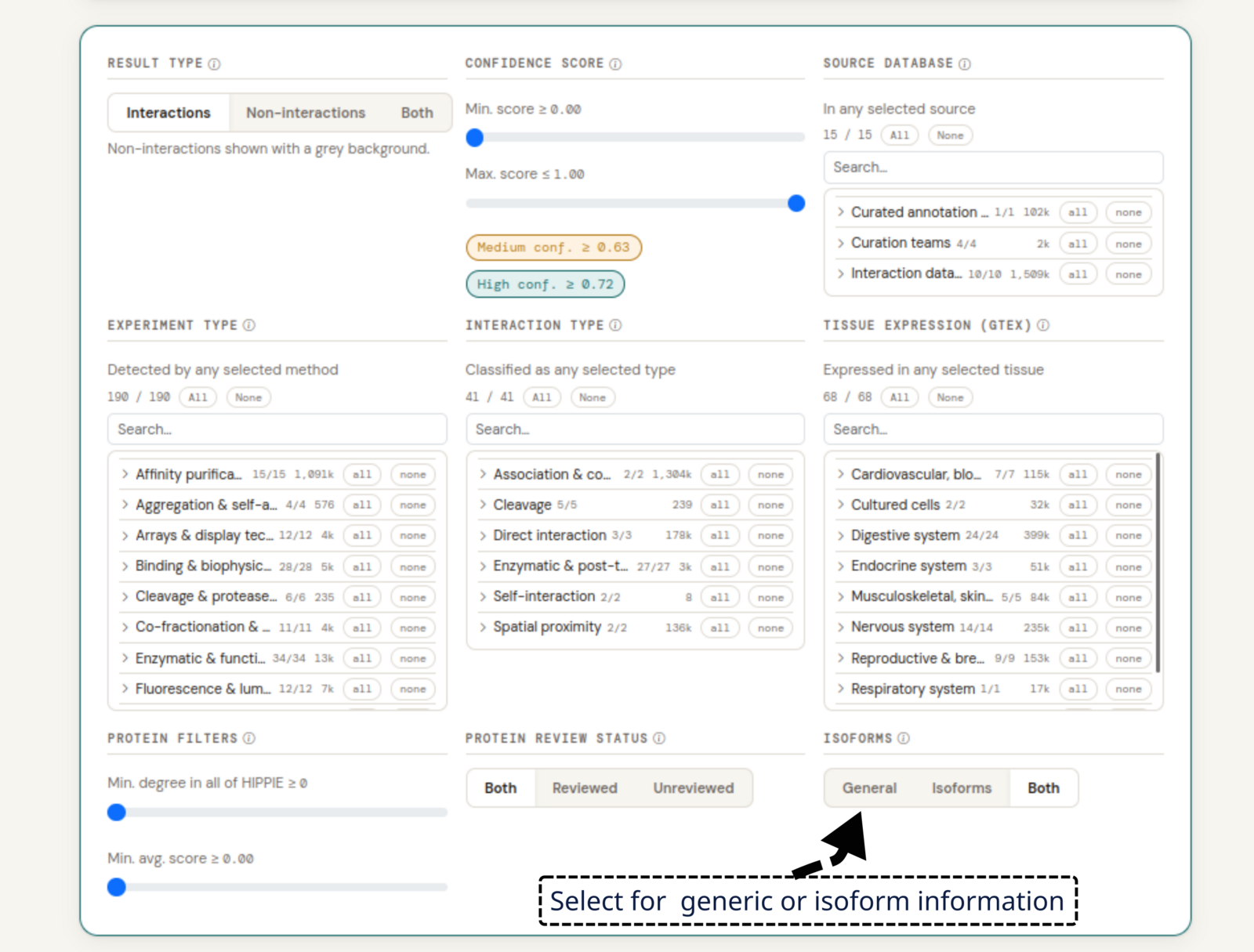
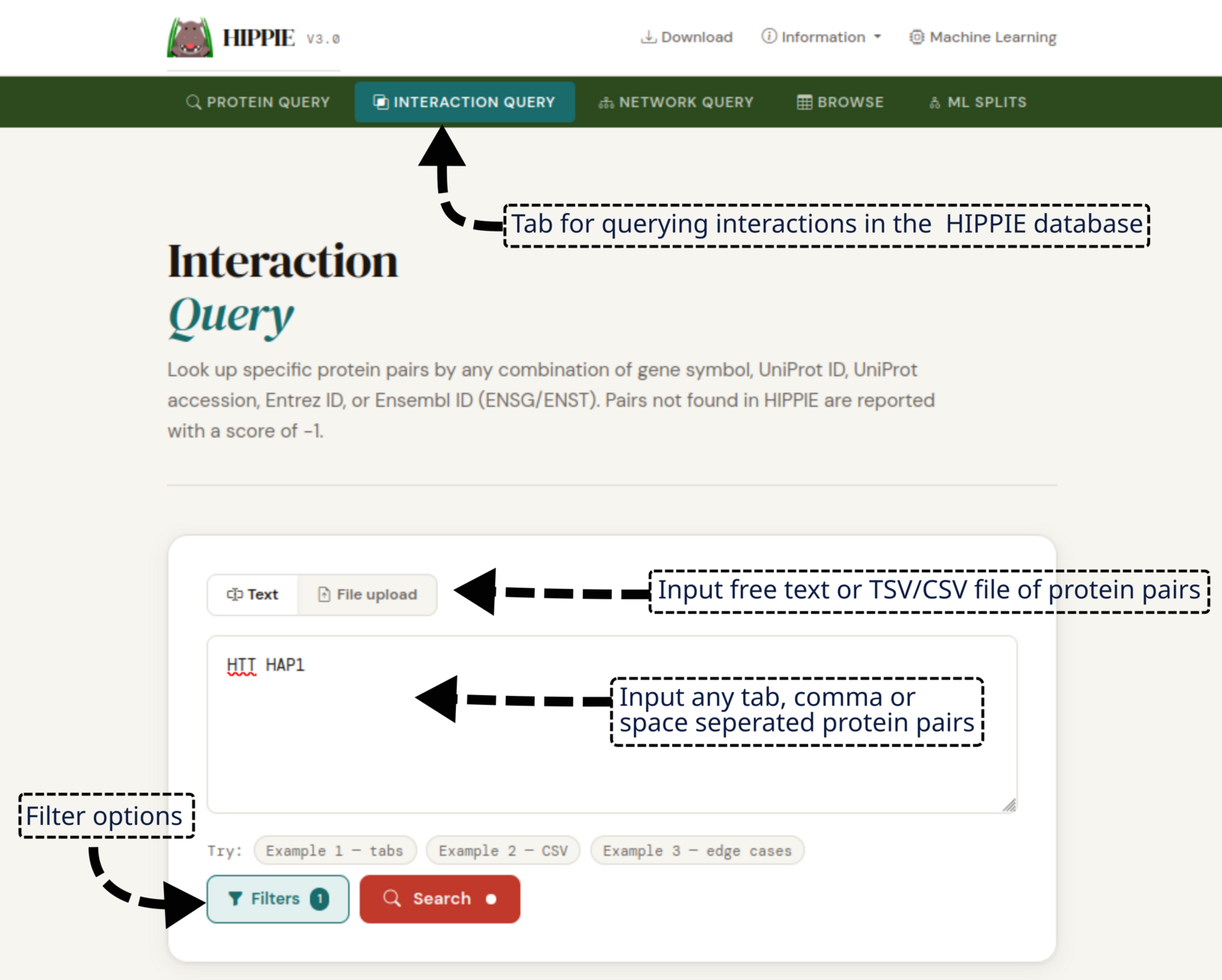
The interaction between HTT and HAP1 shows isoform-specific information, and in the interaction query we can query the database for this interaction. Typing “HTT HAP1” in the search field and setting the isoform filter to “both” (general proteins and isoforms) shows two interactions, one of which is with isoform 2 of HAP1, which is not the canonical one. Selecting this entry shows all the information we have on the interaction, with links to, for example, the publications or an isoform-specific detail view in DIGGER.
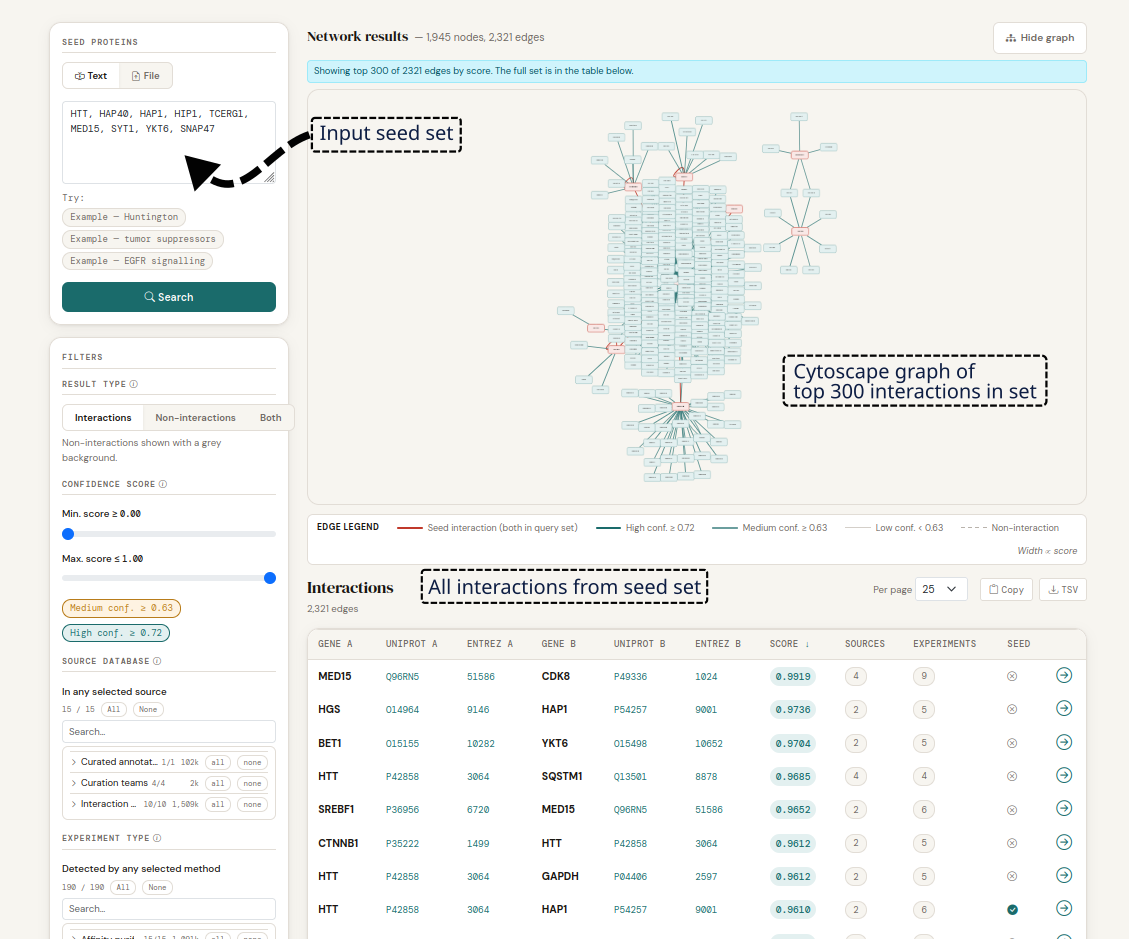
To expand this view into a broader interaction network around HD-associated proteins, we gathered additional seed proteins relevant to HD from the literature: F8A3 (HAP40) and HIP1, TCERG1 and MED15, as well as SYT1, YKT6 and SNAP47. Together with HTT and HAP1 from above, searching for all of them in the network query reveals 2,300 interactions, seven of which exceed the confidence score of the benchmark HTT–HAP1 interaction.
Example of a custom HIPPIE PPI network
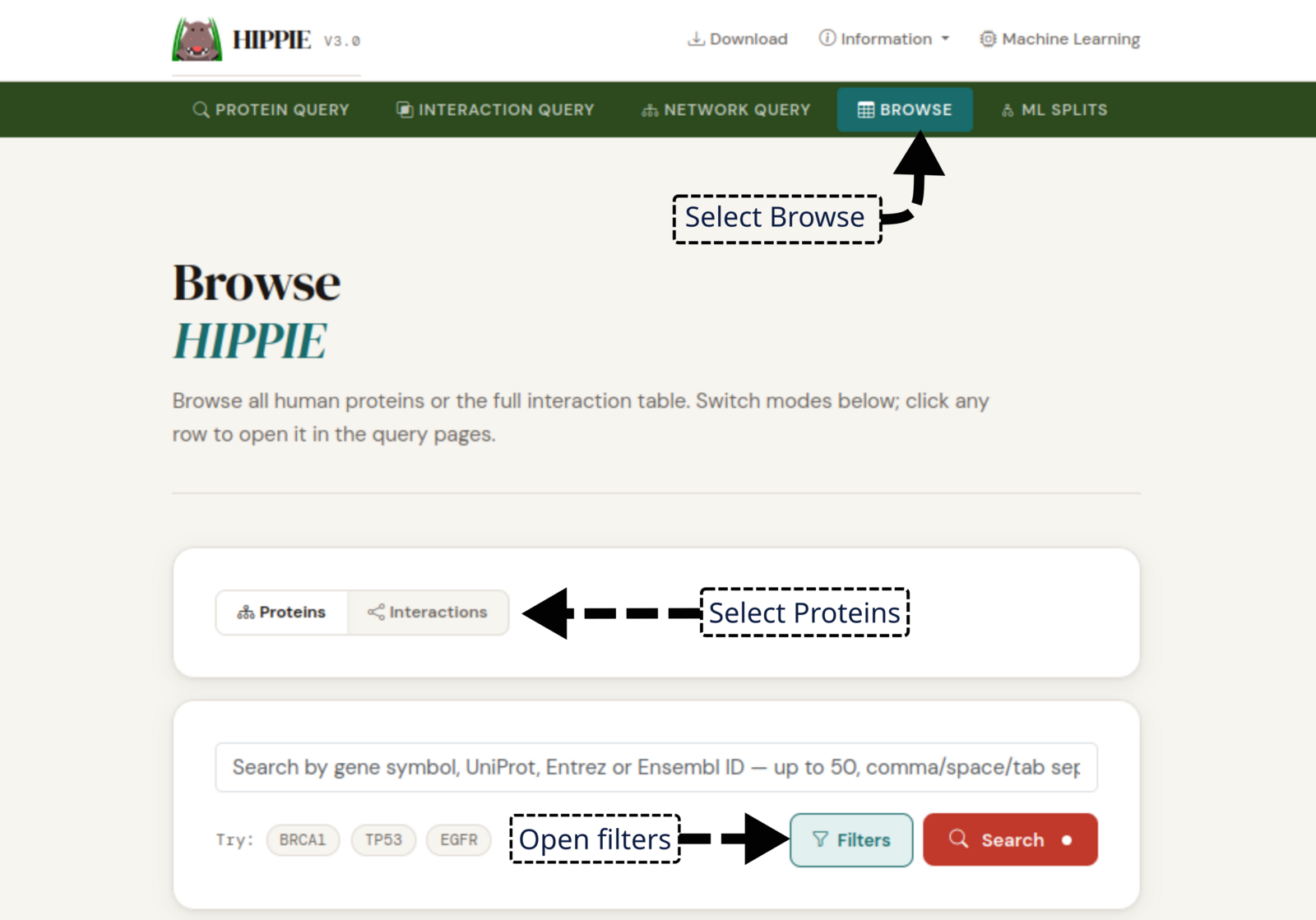
Custom PPI networks can be extracted from HIPPIE using the Browse mode. For example, to extract a network of yeast two-hybrid (Y2H) interactions between proteins expressed in the brain.
First, we go to the Browse mode and select "Proteins", where we filter for proteins expressed in the brain. After applying the filter, we can download the list of proteins as a TSV file called "hippie_browse_proteins.tsv". This file contains the UniProt accessions of all proteins with a median TPM at or above the set threshold in any of the selected brain tissues.

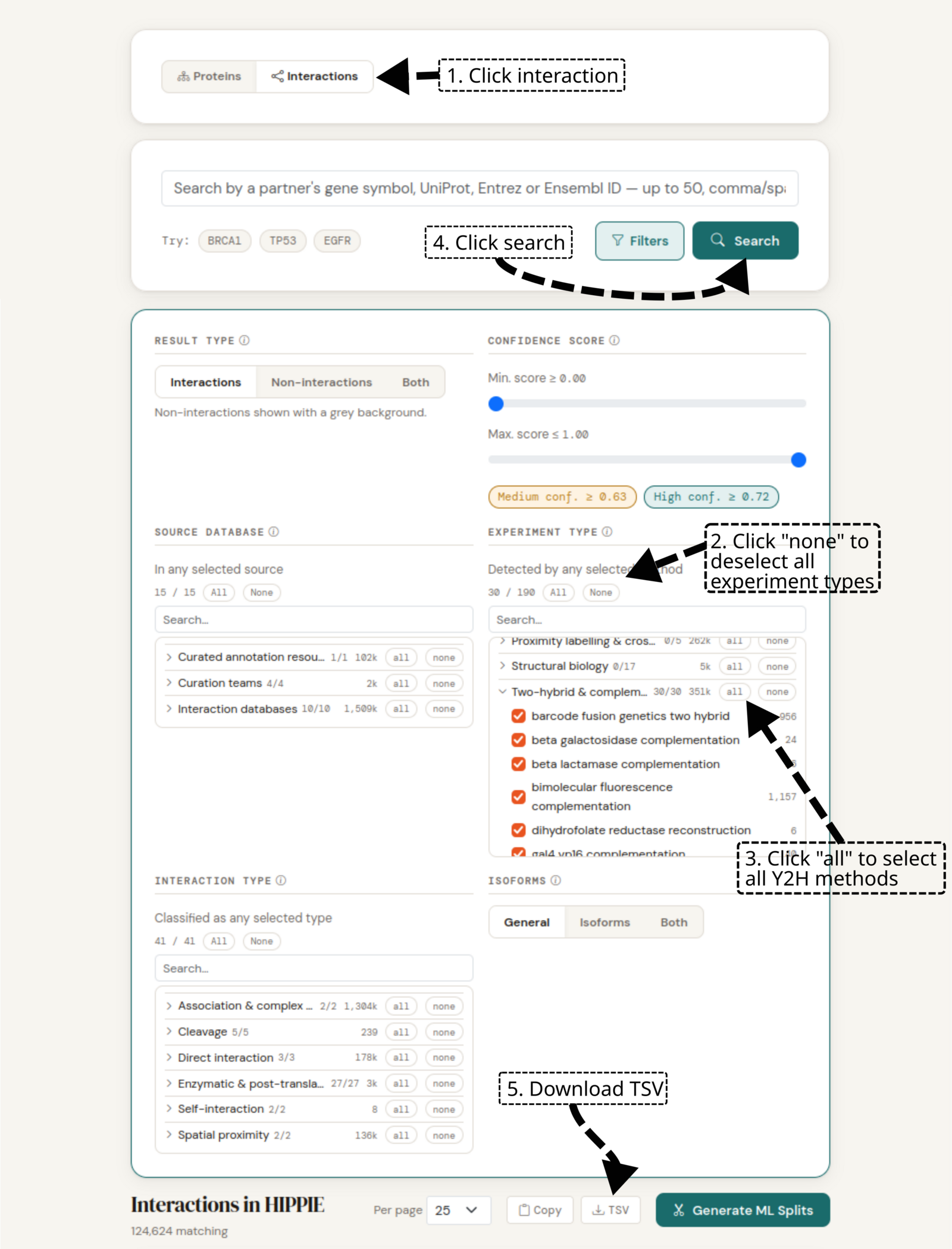
Second, to obtain our Y2H interactions we select "Interactions" at the top of the screen. We then open the filter options and deselect all types by pressing "none" at the top of the "Experiment type" filter. Subsequently, we click "all" on the "Two-hybrid & complementation" option. We apply the filter by pressing "search" and download the interactions by pressing the TSV button. This will download a file called "hippie_browse_interactions.tsv" containing all Y2H interactions.
Given these two files, we can now extract the Y2H interactions between proteins expressed in the brain, ready for analysis.
Back to topSources
HIPPIE integrates interaction data from 15 data sources (1 curated annotation resource, 4 curation teams, 10 interaction databases). Their counts add up to more than the total number of interactions, as several sources often report the same interaction; every source reporting an interaction is listed on its detail page. What each source is — many are curation teams or acronyms — is explained in the filter guide.
| Source | Number of interactions |
|---|---|
| biogrid | 934417 |
| intact | 524211 |
| UniProt | 102139 |
| MINT | 40712 |
| DIP | 7680 |
| bhf-ucl | 1720 |
| matrixdb | 1496 |
| I2D | 392 |
| HPIDb | 322 |
| Molecular Connections | 242 |
| InnateDB | 155 |
| mbinfo | 127 |
| NTNU | 23 |
| FlyBase | 6 |
| mpidb | 4 |
Resource versions
Source databases and reference resources integrated in the current HIPPIE release (v3.0, Oct. 20, 2026).
| Resource | Version |
|---|---|
| UniProt (sec_ac) | UniProt Release 2026_02 |
| UniProt (idmapping) | UniProt Release 2026_02 |
| NCBI Gene | Mon, 06 Jul 2026 08:06:09 GMT |
| IntAct (human) | Wed, 14 Jan 2026 11:58:40 GMT |
| IntAct (full) | Wed, 14 Jan 2026 11:51:57 GMT |
| BioGRID | 5.0.259 |
| GTEx (sample attributes) | v11 |
| GTEx (gene reads) | v11_2025-08-22 |
| Alliance of Genome Resources | 9.0.0 |
| WormBase | WS298 |
| RGD | build 2024-06-24.generated2026/06/27 |
| MGI | Tue, 30 Jun 2026 10:31:44 GMT |
| ZFIN | Mon, 06 Jul 2026 05:06:31 GMT |
| Xenbase (X. tropicalis) | v1.2 |
| Xenbase (X. laevis) | v1.2 |
| FlyBase | fb_2026_01 |
| SGD | Fri, 03 Jul 2026 09:11:37 GMT |
| UniProt → Orthology map | generated |
| Technique scoring | 3.0 |
| Negative Data | manual |
Isoforms
A single gene can give rise to several protein isoforms through alternative splicing.
HIPPIE identifies an isoform by its UniProt isoform accession (for example P37163-2),
in comparison to the plain accession
(P37163). On an interaction's detail page the canonical isoform of a gene is marked
with a canonical chip; canonical status is determined
by which isoform is referenced by UniProt to have the same UniParc sequence as the general protein.
Whether isoform-level interactions appear in a result is controlled by the three-way Isoforms filter.
To provide isoform- and domain-resolved interaction information, each interaction's detail page cross-links to DIGGER, which maps protein-protein interactions to the specific domains and isoforms that mediate them.
Back to topCitation
If you use HIPPIE in your research, please cite:
Alanis-Lobato G, Andrade-Navarro MA, & Schaefer MH. (2016). HIPPIE v2.0: enhancing meaningfulness and reliability of protein-protein interaction networks. Nucleic Acids Research, gkw985 [link].
Related manuscripts:
- Schaefer MH, Fontaine J-F, Vinayagam A, Porras P, Wanker EE, et al. (2012) HIPPIE: Integrating Protein Interaction Networks with Experiment Based Quality Scores. PLoS ONE, 7(2): e31826 [link]
- Schaefer MH, Lopes TJS, Mah N, Shoemaker JE, Matsuoka Y, et al. (2013) Adding Protein Context to the Human Protein-Protein Interaction Network to Reveal Meaningful Interactions. PLoS Computational Biology, 9(1): e1002860 [link]
- Suratanee A, Schaefer MH, Betts M, Soons Z, Mannsperger H, et al. (2014) Characterizing Protein Interactions Employing a Genome-Wide siRNA Cellular Phenotyping Screen. PLoS Computational Biology, 10.9: e1003814 [link]
Contact
Please send questions or comments on HIPPIE to: martin.schaefer@ieo.it
HIPPIE is hosted by the CBDM group at the JGU in Mainz.
Back to topPrivacy Policy
To understand how HIPPIE is used for scientific research and to guide its future development, this website uses the privacy-friendly analytics tool Umami, running on our own server. Umami does not use cookies and records only anonymous, aggregated usage statistics; no personal profiles are created and nothing is shared with third parties for analytics.
Like most websites, HIPPIE loads its fonts (Google Fonts) and parts of its user interface (jsDelivr, and cdnjs for the network viewer) from external servers. As with any web request, these services receive your IP address in order to deliver the files.
Back to top