
Machine
Learning
Resources, key papers, and a working example for building a protein–protein interaction prediction model from HIPPIE data — taking bias and data leakage into account.
Before training a PPI predictor, read these. They explain why most reported PPI-prediction accuracies are inflated, and how to build honest evaluations.
Here we show a typical end-to-end example: choose data, export it from HIPPIE, build a leakage-aware train/validation/test split with the ppi-splitting-pipeline, train two contrasting models (a classic feature-based baseline and a sequence-based model), and evaluate honestly. Take this both as a tutorial if you want to start with PPI prediction and as a resource showing the pitfalls of data leakage.
How do I choose my data?
A PPI classifier needs positive examples (interacting pairs) and negative examples (non-interacting pairs). HIPPIE gives you scored positives and curated non-interactions, but the difficult part is splitting the data in a way that reduces biases and data leakage.
- Positives — the interacting protein pairs. Higher confidence thresholds (≥ 0.72, high confidence) trade quantity for reliability.
- Negatives — there is no gold-standard "these never interact" set. HIPPIE provides curated non-interactions, but these do not cover all HIPPIE proteins and probably still have to be subsampled to match some distributional properties of the positives. Alternatively, negatives can be sampled from pairs with no known interaction. The PPI splitting pipeline can do both.
- Example 1: Test proteins also occur in the training dataset. Negatives were sampled by randomly pairing proteins. The positive degree distribution follows a power law, while the negative distribution follows a normal distribution. The model can therefore memorize that hub proteins are more likely to interact than not to interact. A test interaction involving a hub protein will therefore always be predicted as positive.
- Example 2: Test proteins are not in the training dataset but negatives were again sampled randomly. The chance of randomly pairing a protein with itself is very small. The model can therefore memorize that a self-interacting candidate is always positive. If the positive test set contains many self-interactions, this will result in inflated performance reports.
How do I get the data out of HIPPIE?
There are three routes, from least to most effort:
- Pre-computed splits — the Download page offers finished splits of the high-confidence interactions, the high-and-medium-confidence ones, and the whole database. If one of these fits, you can skip to step 5.
- Splits generated on the server — the ML Splits page can also run the pipeline for you. This is convenient, but jobs are queued and run one at a time. A run takes about 35 minutes on average and is stopped after 3 hours at the latest; a filter set too large or complex for that has to go through the raw-data route instead. Because of our computational constraints the server also gives the optimisation steps a much smaller time and memory budget than a local run (at most 30 minutes instead of 2 hours per ILP, on 2 CPUs). The resulting splits are valid but usually less well optimised than what you get locally. For more information, go to step 3.
- Raw data + your own pipeline run — filter HIPPIE the way you need on the ML Splits page, download the filtered data, and build the split yourself on your own machine or cluster. For more information, go to step 4.
Splitting with HIPPIE
Let's assume we are only interested in the HIPPIE high-confidence interactions that were obtained with
proximity labelling. We select high-confidence interactions (click on the button) and filter the experiment type
to only contain proximity labelling technology. Afterward, we click on Calculate Statistics.
The interface shows us some protein and interaction statistics. In this case, the resulting network contains
5,750 proteins and 25,793 interactions.

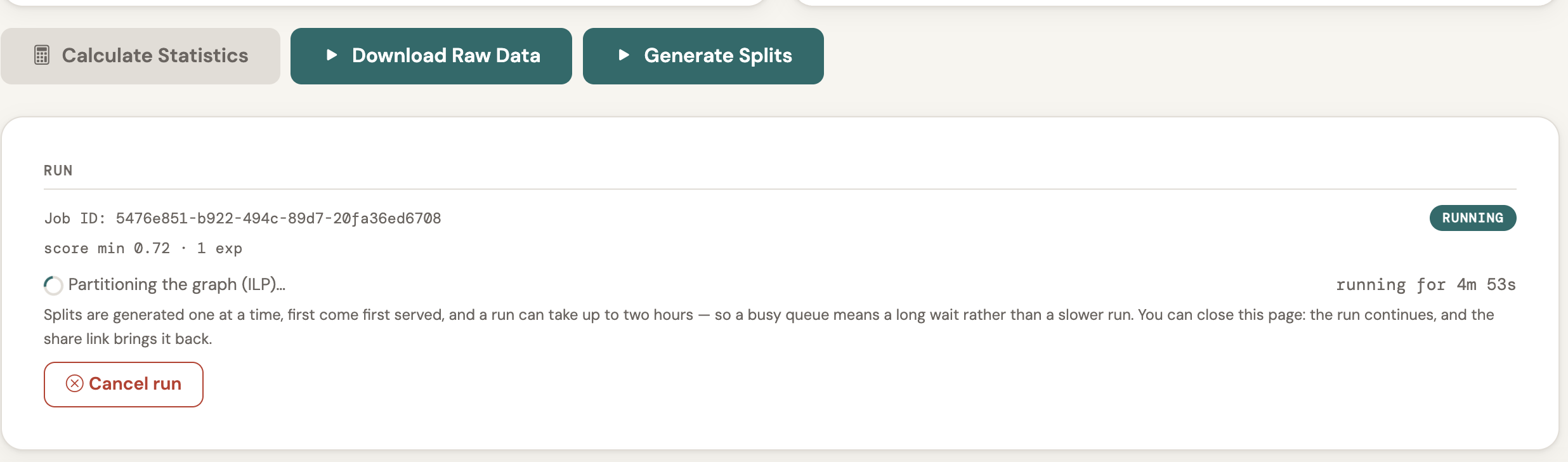
Next, we click on Generate Splits. A run takes about 35 minutes on
average, but the two ILPs in the pipeline are each allowed to run for up to 30 minutes on the server. The larger
the dataset, the less likely it is that an ILP finds the optimal solution within that limit; it then
returns the best solution found so far, which may be suboptimal.
The splitting ILP splits the dataset into 80% training, 10% validation, and 10% test. It minimizes the number of
discarded edges and ensures low sequence similarity between the splits. If you want to try to save more
edges from being discarded, you can run your own local version of the PPI splitting pipeline and set
the limit higher. The sampling ILP mirrors the degree distribution of the positive set and ensures that there
are as many negative examples of self-interactions as there are positive examples. The training, validation
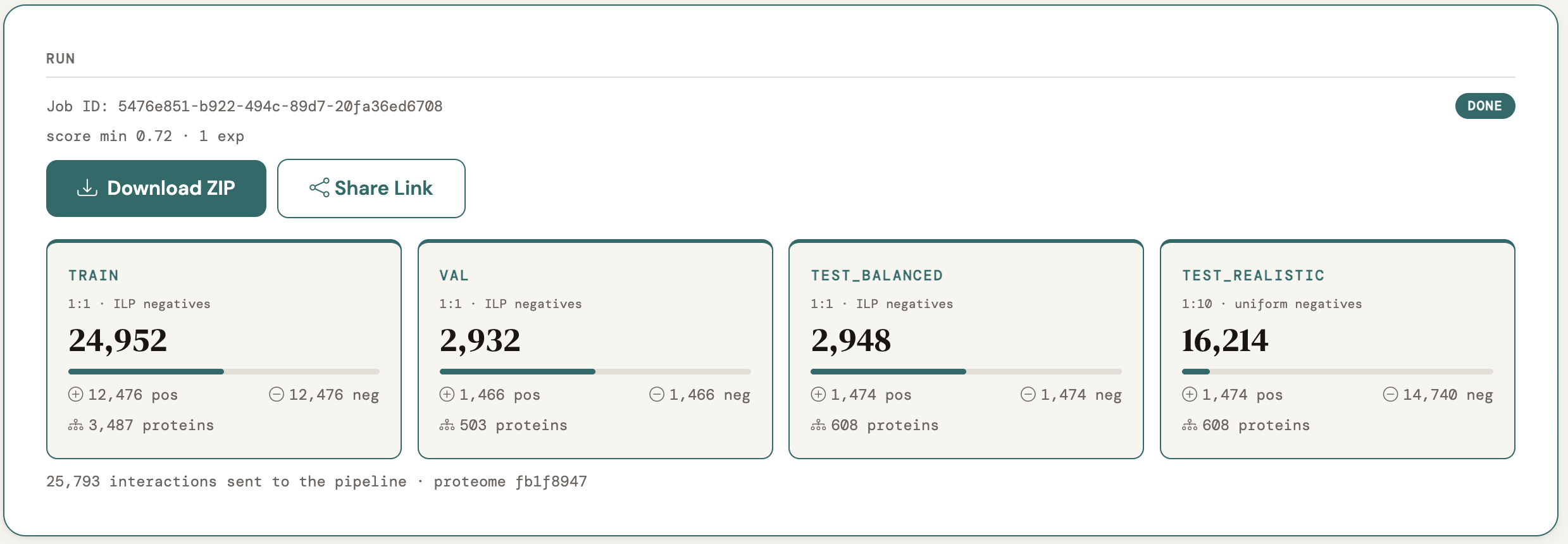
and balanced test sets contain positives and negatives at a 1:1 ratio. Finally, a 1:10 test set is also generated to simulate a realistic
scenario where negatives are randomly distributed and strongly outnumber the positives.
When the pipeline is done, it will report the final stats of your ML splits. You can download your data with
Download ZIP. The resulting ZIP contains train.csv, val.csv,
test_balanced.csv and test_realistic.csv, plus
sequences.fasta (the sequence of every protein in the splits),
summary.json (the per-split counts) and README.txt
(the filters you applied, the counts and the pipeline commit the split was cut with).
How do I build the split with the pipeline?
For the raw-data route, you can use the whole database. On the ML Splits page, leave every filter at its default (or narrow it — e.g. to proteins with a minimum expression in a specific tissue, from median gene-level RNA-seq of GTEx v11_2025-08-22; see the filter guide), click Calculate Statistics, then Download Raw Data. The ZIP contains:
ppis.csv— the filtered interactions:protein1,protein2,score(UniProt accessions, isoforms included).candidate_negatives.csv— only when curated HIPPIE non-interactions match your filters:protein1,protein2,w. Negative sampling is then restricted to this pool.samplesheet.csv— a ready-made one-row samplesheet for the pipeline.README.txt— the filters you applied, the counts, and the exact command to run.
The ppi-splitting-pipeline is a Nextflow pipeline. You need:
- Nextflow >= 26.04 and a container
engine such as Docker (used below) or a conda installation like mamba, matching the
-profileyou pick. - Internet access — protein sequences and annotations are fetched from UniProt.
- Resources. Check out the nextflow.config and potentially adapt the number of cpus or memory requested. It is
best to run the pipeline on a cluster with a fitting HPC config supplied via
-c. Check out the nf-core configs for examples. - A Gurobi
license (free for academics) is the pipeline default. The pipeline looks for
gurobi.licin the folder you launch it from, so copy your license file intohippie_raw_data/(or point to it with--gurobi_license /path/to/gurobi.lic). Without a license, pass the flags shown below to use open-source solvers instead.
# 1. get the pipeline next to the unzipped raw data (sibling folders)
git clone https://github.com/bionetslab/ppi-splitting-pipeline
unzip hippie_splits_<job-id>.zip -d hippie_raw_data   # the file you downloaded
cd hippie_raw_data
cp /path/to/gurobi.lic .   # skip if you use the open-source solvers below

# 2. run it (pick the profile matching what you have installed)
nextflow run ../ppi-splitting-pipeline/main.nf \
    --samplesheet samplesheet.csv --outdir results -profile docker

# no Gurobi license? append:
#   --ilp_solver '' --gurobi_license ''
What the pipeline does with your data:
- Fetches the sequences and compares every protein against every other (BLAST) to build a sequence-similarity graph, which is then partitioned into clusters of similar proteins.
- Splits the positives into train / validation / test with an ILP that keeps similar proteins on the same side, then removes remaining homologous train/test pairs with CD-HIT-2D. Expect noticeably fewer pairs than you exported.
- Samples negatives with a second ILP that matches the positives' degree, taxon-pair, self-loop and GO-similarity profile (1:1), plus a separate realistic test set with uniformly sampled negatives at 1:10.
- Trains a small baseline classifier and writes a MultiQC report
(
results/multiqc/multiqc_report.html) with split sizes, bias diagnostics and similarity heatmaps.
The splits you need land in results/hippie/:
train.csv,val.csv,test_balanced.csv— 1:1 positives to bias-matched negatives.test_realistic.csv— 1:10 with uniform negatives, simulating an uncontrolled screen.- Each has the columns
protein1,protein2,label,score(label1 = interacts, 0 = negative); the sequences are inresults/hippie/data/sequences.fasta.
How do I create a model with the data?
We build two models side by side: a cheap feature-based baseline and a protein-language-model model. Both share the same split so the comparison is fair. The code below is also available as a Jupyter notebook.
Setuppip install pandas numpy scikit-learn biopython torch transformers tqdm ipywidgets matplotlib # with a GPU: install torch first as shown on pytorch.org, so you get a CUDA build. # Everything also runs on a CPU, only the embedding step is slower.Load the data and check the split
import pandas as pd

DATA = "hippie_split"   # the unzipped ZIP from step 3; for your own run: "results/hippie"
splits = {name: pd.read_csv(f"{DATA}/{name}.csv")
          for name in ["train", "val", "test_balanced", "test_realistic"]}
# columns: protein1, protein2, label (1 = interacts, 0 = negative), score

# sanity check 1: class balance -- about 50 % positives, except test_realistic (about 9 %)
for name, df in splits.items():
    print(f"{name:15s} {len(df):7d} pairs   positives: {df.label.mean():.1%}")

# sanity check 2: held-out proteins that also occur in training -- should be close to 0 %
def proteins(df):
    return set(df.protein1) | set(df.protein2)

train_prots = proteins(splits["train"])
for name in ["val", "test_balanced", "test_realistic"]:
    prots = proteins(splits[name])
    print(f"{name:15s} {len(prots & train_prots) / len(prots):.1%} of proteins also in train")
The second check shows what the pipeline's split buys you: no protein in the validation or test sets was seen in training. In a random pair split this number is close to 100 %.
A — Cheap baseline (scikit-learn)Each protein is described by its amino-acid composition and length, and a pair by the sum and the absolute difference of its two proteins' vectors, so (A, B) and (B, A) look the same. These features need nothing from the training network, so they also work for unseen proteins. A sequence model that cannot clearly beat this has learned little beyond composition.
import os

import numpy as np
from Bio import SeqIO
from sklearn.linear_model import LogisticRegression
from sklearn.metrics import roc_auc_score
from sklearn.pipeline import make_pipeline
from sklearn.preprocessing import StandardScaler

# FASTA headers are UniProt accessions; the ZIP has sequences.fasta at its root
# (if your headers look like sp|P12345|NAME, the split below keeps just the accession)
fasta = f"{DATA}/sequences.fasta"
if not os.path.exists(fasta):   # for your own run
    fasta = f"{DATA}/data/sequences.fasta"
seqs = {r.id.split("|")[1] if "|" in r.id else r.id: str(r.seq)
        for r in SeqIO.parse(fasta, "fasta")}

def usable(df):   # drop pairs whose sequence is missing from the FASTA
    keep = df.protein1.isin(seqs.keys()) & df.protein2.isin(seqs.keys())
    if (~keep).any():
        print(f"dropping {(~keep).sum()} pairs without a sequence")
    return df[keep]

splits = {name: usable(df) for name, df in splits.items()}
train, val = splits["train"], splits["val"]

AA = "ACDEFGHIKLMNPQRSTVWY"
def composition(seq):
    counts = np.array([seq.count(a) for a in AA], dtype=float)
    return np.append(counts / len(seq), np.log(len(seq)))

comp = {p: composition(s) for p, s in seqs.items()}

# symmetric pair features: (A, B) and (B, A) give the same vector
def pair_features(vec, df):
    return np.array([np.concatenate([vec[a] + vec[b], np.abs(vec[a] - vec[b])])
                     for a, b in df[["protein1", "protein2"]].itertuples(index=False)])

base_clf = make_pipeline(StandardScaler(), LogisticRegression(max_iter=1000))
base_clf.fit(pair_features(comp, train), train["label"])
print("val AUROC baseline:",
      roc_auc_score(val["label"], base_clf.predict_proba(pair_features(comp, val))[:, 1]))
Embed each protein sequence with a protein language model (ESM-2), combine the pair the same symmetric way, and train a random forest. More expressive, and far more prone to leakage. Embedding is the slow part, so it runs on a GPU when one is available, shows a progress bar, and caches the result. A rerun skips it. For a whole-database split on a 12-core CPU without a GPU, expect about 30 minutes for the embeddings (once) and about 8 minutes for the two random forests below.
import os
import torch
from sklearn.ensemble import RandomForestClassifier
from tqdm.auto import tqdm
from transformers import AutoModel, AutoTokenizer

# smallest ESM-2 (8M parameters, 320-d). Bigger and usually better:
# facebook/esm2_t12_35M_UR50D, facebook/esm2_t33_650M_UR50D (GPU recommended)
MODEL = "facebook/esm2_t6_8M_UR50D"
cache = f"embeddings_{MODEL.split('/')[-1]}_{DATA.strip('/').replace('/', '-')}.npz"

if os.path.exists(cache):
    emb = dict(np.load(cache))
else:
    device = "cuda" if torch.cuda.is_available() else "cpu"
    print("embedding on", device)
    tokenizer = AutoTokenizer.from_pretrained(MODEL)
    model = AutoModel.from_pretrained(MODEL, add_pooling_layer=False).eval().to(device)

    # sort by length so each batch pads as little as possible
    needed = sorted(set().union(*(proteins(df) for df in splits.values())),
                    key=lambda p: len(seqs[p]))
    emb, BATCH = {}, 32   # lower BATCH if you run out of (GPU) memory
    for i in tqdm(range(0, len(needed), BATCH), desc="ESM-2", unit="batch"):
        batch = needed[i:i + BATCH]
        chunk = [seqs[p][:1022] for p in batch]   # ESM-2 context limit
        tokens = tokenizer(chunk, return_tensors="pt", padding=True).to(device)
        with torch.no_grad():
            hidden = model(**tokens).last_hidden_state
        for j, (p, s) in enumerate(zip(batch, chunk)):
            # mean over the residues only: skip the start token and the padding
            emb[p] = hidden[j, 1:len(s) + 1].mean(0).cpu().numpy()
    np.savez(cache, **emb)

# a random forest prints no progress, so grow it in chunks of trees behind a progress bar
# (same forest as one fit; raise step if you have many more cores than 25)
def fit_forest(X, y, desc, n_trees=300, step=25):
    rf = RandomForestClassifier(n_estimators=0, warm_start=True, n_jobs=-1, random_state=0)
    for _ in tqdm(range(0, n_trees, step), desc=f"{desc} ({n_trees} trees)", unit="step"):
        rf.n_estimators += step
        rf.fit(X, y)
    return rf

X_train, X_val = pair_features(emb, train), pair_features(emb, val)
seq_clf = fit_forest(X_train, train["label"], "sequence model")

# tune hyperparameters on the validation split (never on the test sets)
print("val AUROC sequence:", roc_auc_score(val["label"], seq_clf.predict_proba(X_val)[:, 1]))
Control: shuffled labels
Train the same model on randomly permuted labels. It cannot learn anything real, so its validation AUROC must be about 0.5. If it is clearly higher, information leaks between train and validation, or the evaluation has a bug.
shuffled = train["label"].sample(frac=1, random_state=0).to_numpy()
ctrl = fit_forest(X_train, shuffled, "shuffled control")
print("val AUROC shuffled labels:", roc_auc_score(val["label"], ctrl.predict_proba(X_val)[:, 1]))
val.csv only, and touch the test sets
once, at the end.
How do I evaluate this?
Score both models on both held-out test sets and always compare against the baseline.
test_balanced (1:1) is comparable to most published numbers;
test_realistic (1:10) is closer to how a predictor is actually used,
and there AUPRC matters far more than AUROC. The shuffled-label control marks
the floor: a model that does not clearly beat it has learned nothing. In the plot, the dashed
lines show what a random guess scores (AUROC 0.5; AUPRC equals the share of positives).
import matplotlib.pyplot as plt
from sklearn.metrics import average_precision_score

models = {   # name -> function that scores a table of pairs
    "baseline": lambda df: base_clf.predict_proba(pair_features(comp, df))[:, 1],
    "sequence": lambda df: seq_clf.predict_proba(pair_features(emb, df))[:, 1],
    "shuffled": lambda df: ctrl.predict_proba(pair_features(emb, df))[:, 1],
}
test_sets = ["test_balanced", "test_realistic"]

rows = []
for test_name in test_sets:
    test = splits[test_name]
    y = test["label"].to_numpy()
    for name, score in models.items():
        proba = score(test)
        rows.append({"test set": test_name, "model": name,
                     "AUROC": roc_auc_score(y, proba),
                     "AUPRC": average_precision_score(y, proba)})
results = pd.DataFrame(rows)
print(results.round(3).to_string(index=False))

# overview plot: one panel per metric, one bar per model
colors = ["#2a78d6", "#eb6834", "#1baf7a"]   # baseline, sequence, shuffled
fig, axes = plt.subplots(1, 2, figsize=(10, 4), sharey=True)
for ax, metric in zip(axes, ["AUROC", "AUPRC"]):
    table = results.pivot(index="test set", columns="model", values=metric).loc[test_sets, list(models)]
    table.plot.bar(ax=ax, rot=0, width=0.75, color=colors, edgecolor="white", linewidth=2, legend=False)
    for x, test_name in enumerate(test_sets):   # random-guess level per test set
        chance = 0.5 if metric == "AUROC" else splits[test_name]["label"].mean()
        ax.hlines(chance, x - 0.4, x + 0.4, colors="#555555", linestyles="--", linewidth=1.5,
                  label="random guess" if x == 0 else None)
    ax.set(title=metric, xlabel="", ylim=(0, 1))
    ax.grid(axis="y", alpha=0.3)
    ax.set_axisbelow(True)
    ax.spines[["top", "right"]].set_visible(False)
axes[0].set_ylabel("score")
fig.legend(*axes[1].get_legend_handles_labels(), loc="upper center", ncol=4, frameon=False)
fig.tight_layout(rect=(0, 0, 1, 0.9))
fig.savefig("evaluation.png", dpi=150)
plt.show()
- Beat the baseline, or report why not. If the sequence model only wins under a random split but ties the baseline under a similarity-aware split, the "win" was leakage.
- Stratify by novelty. Report metrics separately for test proteins that are dissimilar to anything in training — that is the realistic use case.
- Fix the seed and publish the split. Reproducibility is part of the result.
For the full reasoning behind each of these checks, see the papers under Key Reading above.